
00 000,00USDT
Android app · Bybit and OKX
A robot trades for you.
Around the clock.
Greenegg Trade runs trading robots on your Bybit and OKX accounts: grid and DCA, spot and futures, BTC, ETH, SOL and XRP. Your money stays on the exchange.
- Key without withdrawal rights
- Stop-loss on the exchange
- 3-day free trial


BTC / USDT · Bybit
00 000,0
Stop-loss on the exchangefires even if the server is offline
App screens · Bybit demo account
Market
Four coins, live prices
The robots trade BTC, ETH, SOL and XRP. The prices below come from Bybit right now — the same ones the app sees.
00 000,00USDT
00 000,00USDT
00 000,00USDT
Live Bybit prices · 24-hour chart
How it works
Up and running in four steps
No money transfers and no complex setup: the robot works right on your exchange account.
- 1
Create an API key on the exchange
On Bybit or OKX — with trading rights and without withdrawal rights. The app shows step by step which boxes to tick.
API key
Permissions the robot needs
ReadTrade: spotTrade: futuresWithdraw fundsYou create the key in the exchange's API settings in a couple of minutes
- 2
Connect the exchange
Paste the key into the app. It checks the key's permissions and refuses a key that can withdraw funds.
Connect
BybitOKXAPI Key · ••••••••••••Secret · ••••••••••••Key accepted
SpotFuturesNo withdrawals
- 3
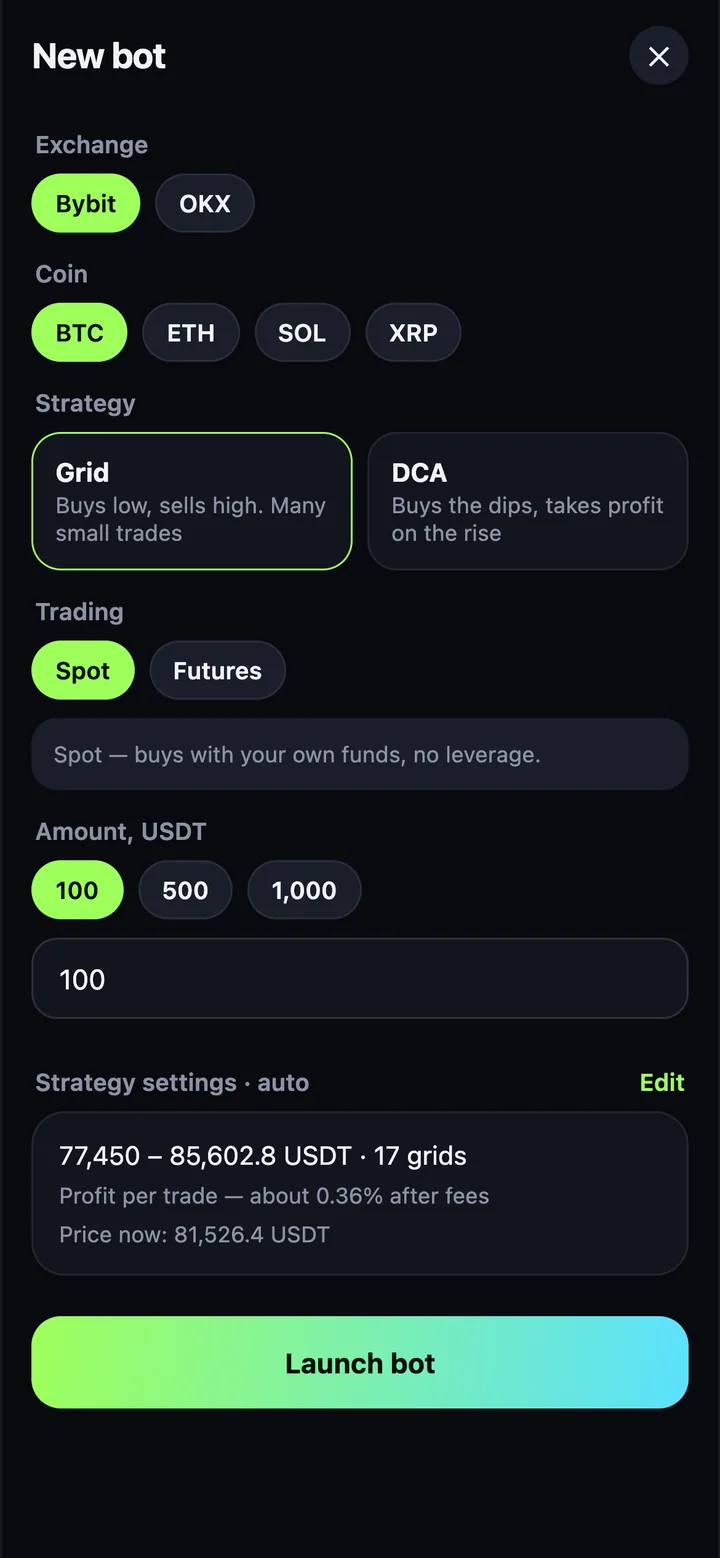
Choose a robot
Coin, strategy, spot or futures, amount and risk mode. The app suggests the strategy settings — you can change any of them.
- 4
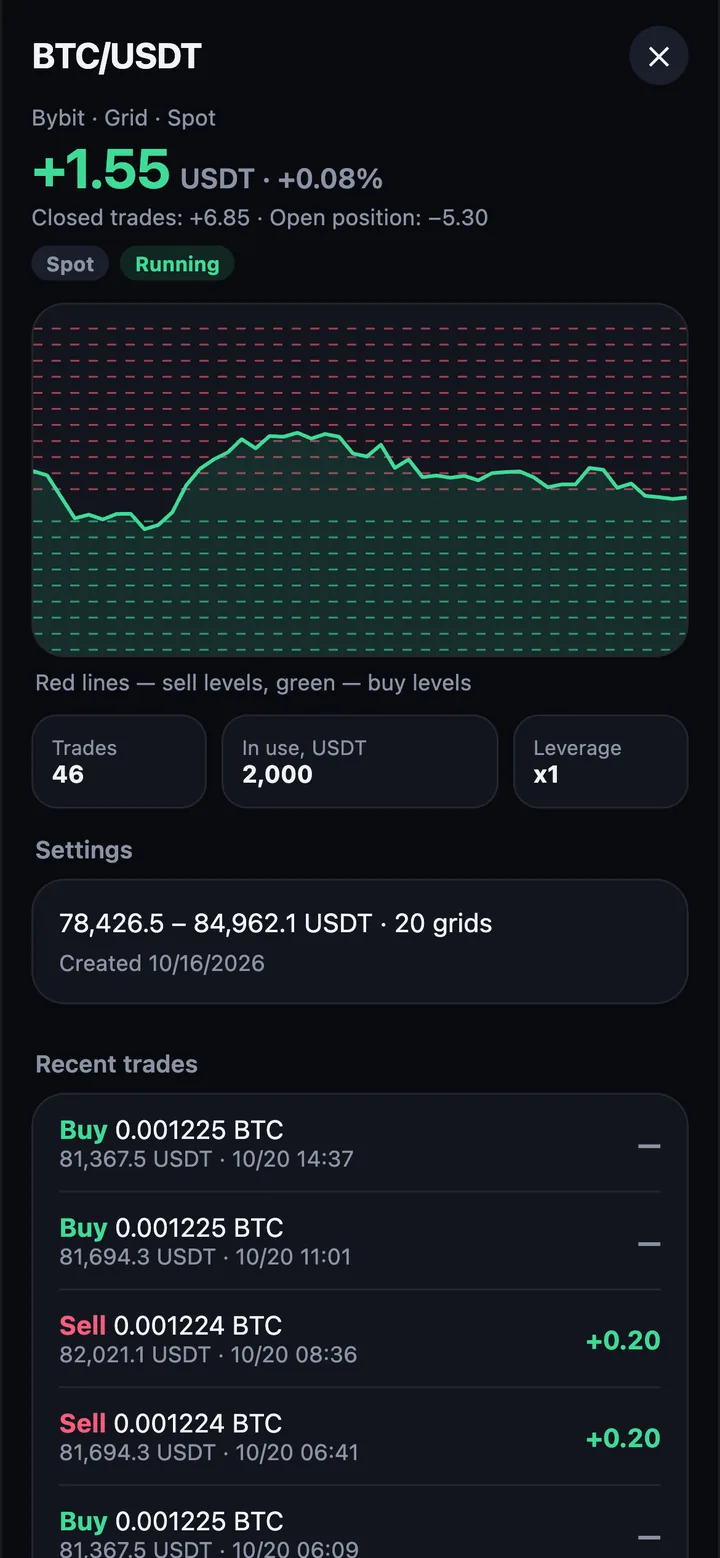
Track the results
Profit, trades and levels on the chart are all in the robot's card. Pause or stop it in one tap.

API key
Permissions the robot needs
Read
Trade: spot
Trade: futures
Withdraw funds
You create the key in the exchange's API settings in a couple of minutes
Robots
Two strategies for different markets
Each robot follows its own math and never gets tired: its orders sit on the exchange even while you sleep.
Grid
Places a ladder of orders across a price range. The price drops a level — the robot buys; it rises a level — the robot sells at a profit. And so on every swing.
- Buy
- Sell
SpotFuturesSideways market
DCA
AveragingBuys at the start and buys more as the price falls, so the average entry price goes down with the market. On the rebound the robot takes profit and starts a new cycle.
- Buy and buy more
- Average price
- Take profit
SpotFuturesPullbacks and rebounds
Risk under control
You decide how much to risk
Two modes for futures. The maximum leverage is always capped by the exchange's rules for the coin.
Soft mode
x1–x10
For calm trading. On futures the stop-loss is on by default.
Aggressive mode
x25–x100
For experienced traders. The robot will not start without a stop-loss — the stop is placed right on the exchange.
Choose leverage
x5soft
A 1% price move is 5% of the amount in the trade, up or down.
On futures the stop-loss is on by default and also sits on the exchange.
Safety
Your money stays on your exchange
The robot only gets access to trading. Everything else stays with you.
Your money never leaves the exchange
The robot trades on your account through an API key. There is no need to move money into the app, and the robot cannot withdraw it.
Your account
Bybit or OKX
Your money stays here
Trading Withdrawal
Robot
Greenegg Trade
Places and cancels orders
Key without withdrawal rights
The app checks the key's permissions and refuses a key that can withdraw funds.
Keys are encrypted
Keys are stored on the server encrypted (AES-256) and are never shown back.
Stop-loss on the exchange
The protective order sits on the exchange itself and fires even if the server goes offline.
Runs 24/7
Robots live on the server, not on your phone. You can close the app.
Support chat
A question about a robot or a payment? Write right in the app — real people answer.
Pricing
Simple plans. Fees only on profit
The first 3 days are free. Then pick a subscription term: the longer it is, the cheaper each month.
1 month
20USDT
billed monthly
3 months
−8%55USDT
18.33 USDT a month
6 months
−29%85USDT
14.17 USDT a month
12 months
Best value125USDT
10.42 USDT a month · −48%
20%
A fee only on new profit
The robot made money — the fee is taken from your in-app balance. It went into a loss — no fee until it wins the loss back and beats its previous result.
- 3-day free trial
- Pay in USDT, BTC, ETH
- A share of your invited friends' payments
FAQ
The essentials, briefly
Do I need to move money into the app?
No. The robot trades on your Bybit or OKX account through an API key, and your money stays on the exchange. The robot cannot withdraw it: the app only accepts a key without withdrawal rights. The in-app balance is only for paying the profit fee.
Does the robot guarantee a profit?
No. The robot runs the chosen strategy without emotions or breaks, but the market can move against it. Trading crypto, especially with leverage, can lose the money you put in. Start with an amount you are prepared to lose.
What happens if the internet or the server goes down?
The robots run on the server around the clock, so your phone can be off. On futures the protective stop-loss sits on the exchange itself, so it fires even if the server loses its connection.
How is the profit fee calculated?
The fee is 20% and only on new profit. If the robot goes into a loss, there is no fee until it wins the loss back and beats its previous result. The fee is taken from your in-app balance; when the balance runs out, the robot pauses until you top it up.
How do I pay for the subscription?
In crypto: USDT, BTC, ETH. Prices are in USDT; BTC and ETH are converted at the rate at the time of payment. The first 3 days are free.
Which exchanges and coins are supported?
Bybit and OKX, spot and futures. Coins: BTC, ETH, SOL and XRP — the robots trade them, and the app has live prices and charts.
Is there a referral program?
Yes. Share your link or code and get a share of every payment your invited friends make: subscriptions and profit fees. Your earnings are shown on the partner screen in the app.
Which phones does the app run on?
The app is for Android phones and tablets. The interface is in English and Russian.

Crack the Market
The app is coming soon. Visit our Telegram to be the first to hear about the launch.